When Zero Trust Breaks UniFi Protect: The Cross-VLAN WebRTC & Firewall Ordering Trap

In my previous architectural walkthrough, I broke down how we overhauled our homelab from a flat /24 network into four air-gapped Layer-2/Layer-3 security zones using UniFi's v2 policy engine: Trusted (172.16.1.0/24), Core (172.16.2.0/24), Security (172.16.3.0/24), and IoT (172.16.10.0/24).
On paper, the security matrix for our physical surveillance enclave was textbook:
- Authorized family devices in
Trustedare allowed to accessSecurityvia Policy10003. - All other internal endpoints (IoT, guest devices, company work phones) are blocked by Policy
10004. - An air-gap barrier (Policy
Block Security to Internal) drops all unsolicited outbound traffic from cameras intoTrustedorCoreto neutralize physical cable-tapping or compromised firmware. - The gateway generates an automatic stateful return rule so that requested video streams can flow back to viewers.
We ran ICMP tests, verified port bindings, checked 10G storage throughput, and called it a successful deployment.
Then, the real-world test arrived: family members opened the UniFi Protect app on their personal iPhones and iPads… and the live video feeds spun indefinitely without ever launching.
Here is the technical post-mortem of why isolating UniFi Protect cameras on a dedicated VLAN breaks mobile feeds—and the two subtle firewall gotchas you need to solve to get sub-second WebRTC streaming back without sacrificing your security perimeter.
1. The Forum Rabbit Hole: “Open Ports 7442, 7444, and 7550”
When UniFi Protect fails across VLANs, the first search query invariably leads to Ubiquiti Community forum threads titled “Adopting cameras across VLANs” or “Protect ports for inter-VLAN routing”.
The top-voted responses universally instruct you to create firewall rules allowing:
- TCP
7442: Camera management protocol - TCP/UDP
7444: Camera WebRTC / live view signaling - TCP
7550: Camera adopt and connect traffic - TCP
7447: RTSPS video streaming
While that advice is technically accurate, it addresses a completely different network topology: one where cameras reside on a dedicated Camera VLAN while the NVR/Console (like a UDM Pro or CloudKey) lives on the default management network.
In our architecture:
- UNVR Gen 2 (
172.16.3.2) and all 6 physical cameras (172.16.3.x) are already on the SAME VLAN (Security— VLAN 3). - Because both the NVR and the cameras share the exact same Layer-2 broadcast domain, all camera adoption, management (
7442), and RTSPS publishing happen directly through the local switch ASICs (Grand Centraland edgeFlexswitches) at hardware line-rate. - The cameras had already transferred over 17 gigabytes of video directly to the UNVR with zero firewall interaction.
The cameras were never the bottleneck. The breakdown was occurring strictly at the boundary between the Client Viewers on Trusted (172.16.1.0/24) and the UNVR on Security (172.16.3.2).
2. Gotcha #1: How Protect Actually Streams Video (WebRTC & Dynamic UDP)
UniFi Protect does not stream live feeds like an ordinary HTTP video player or an RTSP media pull.
To achieve sub-second latency and responsive multi-camera matrix views on iOS and Android devices, the Protect mobile app relies on WebRTC (Web Real-Time Communication):
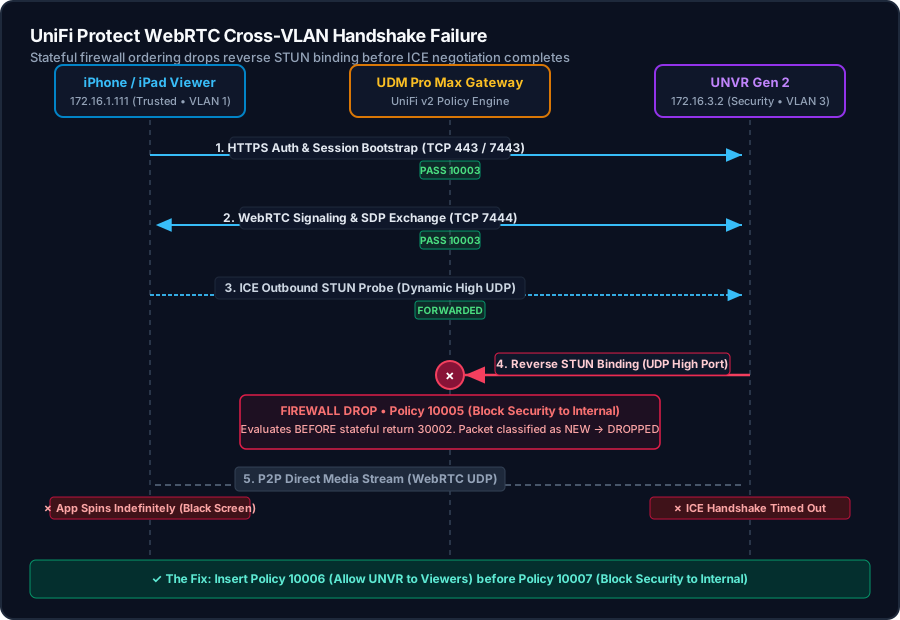
- Signaling & Bootstrap: The phone connects via HTTPS to
172.16.3.2:443/7443for authentication, then establishes a persistent signaling channel over TCP7444to exchange SDP (Session Description Protocol) session descriptors. - ICE Candidate Gathering: Both endpoints exchange their local IP addresses and random UDP port candidates to discover a direct peer-to-peer media path.
- The STUN Check (Where It Dies): During the Interactive Connectivity Establishment (ICE) phase, both the client AND the UNVR send UDP binding requests to each other on high ephemeral ports.
- The Conntrack Reality: A standard stateful firewall expects the client to initiate traffic outbound and tracks the response. When the UNVR originates a UDP STUN packet to an ephemeral port on the iPhone, the firewall conntrack engine has no prior state for that specific port tuple. It classifies the packet as
NEW—and drops it.
Note — Why didn't the Admin Phone notice right away?
On the primary account owner's phone, UniFi Protect has cloud remote access enabled via Ubiquiti's cloud broker. If a local direct WebRTC handshake fails, the app silently falls back to a TURN relay over the Internet (routing video out through WAN and back). It works, but with noticeable latency and high cloud relay dependence.
For family members, local users, and family iPads with cloud relay disabled or operating over local Wi-Fi, there is no WAN fallback: the app sits on a black screen with a spinning loader.
3. Gotcha #2: UniFi v2 Policy Engine Rule Indexing & Evaluation Order
Even if you configure stateful return traffic, the UniFi v2 Zone-Based Policy Engine has a subtle execution priority rule that catches many administrators by surprise.
In UniFi Network, firewall policies evaluate in strict ascending numerical index order:
10000–19999 : User-Defined Policy Rules (Pre-System) <-- Rule 10005 sat here!30000–39999 : Predefined System & Stateful Return Rules <-- Auto-Return sat at 30002!40000–49999 : User-Defined Policy Rules (Post-System) <-- Block IoT sits at 40000
When you define a block rule (like Block Security to Internal) via the UI or API without specifying its position relative to predefined system rules, it defaults into the 10000 block (e.g., Index 10005).
Here is what happens to a packet under that sequence:
- An iPhone (
172.16.1.111) sends a TCP SYN packet to UNVR (172.16.3.2:7443). - Evaluated at
Index 10003(Allow Viewers to Security). Match: ALLOW. - The UNVR receives the SYN and replies with a TCP SYN-ACK back to
172.16.1.111. - The gateway receives the return packet from
172.16.3.2destined for172.16.1.111and evaluates the firewall chain in order:Index 10000..10004: No match.Index 10005 (Block Security to Internal): Matches SourceSecurity→ DestinationInternal. Action: BLOCK!
- The return packet is dropped at Index 10005! It never reaches the auto-respond stateful return rule at
Index 30002because10005 < 30002.
This is why Block ioT worked flawlessly at Index 40000 (evaluating after the 30000 return rules), while Block Security to Internal choked all return communication when placed at Index 10005.
4. The Solution: NVR Egress Exception & Rule Reordering
To establish seamless WebRTC streaming without poking gaping holes in our security perimeter, we implemented a two-step architectural adjustment:
Step 1: Separate the NVR Server from the Camera Threat Model
An outdoor camera or doorbell has an exposed physical cable; if an intruder snips the cable or unmounts the camera, they could plug an attacker laptop directly into the Security VLAN port. That is why an air-gap block rule is mandatory.
However, the UNVR Gen 2 is a locked server mounted inside an interior equipment rack. It does not pose a physical cable-tapping threat. By treating the UNVR IP (172.16.3.2) as an application server with explicit permissions to talk to the authorized viewer devices, we solve the WebRTC UDP handshake.
Step 2: Deploy the Production Firewall Chain
We updated the v2 policy chain on our UDM Pro Max to the following priority structure:
| Index | Policy Name | Action | Source | Destination | Purpose & Enforcement |
|---|---|---|---|---|---|
| 10003 | Allow Viewers to Security | ALLOW | Authorized Viewers (.3, .116, .111, .142, .191) |
Security (172.16.3.0/24) |
Permits family workstations, phones, and tablets to reach UNVR. |
| 10004 | Block All to Security | BLOCK | ANY Internal Source |
Security (172.16.3.0/24) |
Security Shield. Drops IoT, guest, and untrusted devices. |
| 10006 | Allow UNVR to Viewers | ALLOW | 172.16.3.2 (UNVR) |
Authorized Viewers (.3, .116, .111, .142, .191) |
WebRTC & NVR Egress. Permits reverse STUN checks & UDP media. |
| 10007 | Block Security to Internal | BLOCK | Security (172.16.3.0/24) |
ANY Internal Zone |
Air-gap barrier. Drops all unsolicited outbound camera/cable traffic. |
| 30002 | Stateful Return Rules | ALLOW | ANY (Established / Related) |
Authorized Viewers | System stateful auto-return inspection. |
Why This Sequence Works
- Bidirectional WebRTC: Because Policy
10006sits ahead of Policy10007, when the UNVR initiates UDP STUN packets to the iPhone during candidate negotiation, Rule10006matches and allows the stream instantly. - Airtight Air-Gap: If an outdoor camera (
172.16.3.125) or a compromised ethernet jack tries to ping172.16.1.2(Unraid) or probe172.16.2.1(Core switches), it skips Rule 10006 (not coming from.2) and is immediately dropped by Policy10007. - No Unwanted Ingress: Any unauthorized device on the network (like a work phone
172.16.1.161or a rogue smart plug) trying to reach the cameras or UNVR is dropped by Rule10004.
5. Verification & Live Results
With the updated policy sequence active, we verified socket and media connectivity across the VLAN boundary:
# Testing UNVR Ports from Trusted Workstation (172.16.1.3 -> 172.16.3.2)
UNVR Port 80   (HTTP Redirect)          : True
UNVR Port 443  (UniFi OS / Protect Web) : True
UNVR Port 7442 (Camera Management)      : True
UNVR Port 7443 (Protect Application API): True
UNVR Port 7444 (WebRTC Signaling)       : True
UNVR Port 7447 (RTSPS Video Streaming)  : True
UNVR Port 7550 (Internal Device Proxy)  : True
When opening the UniFi Protect app on Farha's iPhone and Zidan's iPad:
- Connection Type: Instant direct local connection (
Direct Access). - Feed Latency: Real-time, sub-second feed launch across all 6 live cameras and doorbell simultaneously.
- Firewall Hit Logs: Policy
10006registered active UDP hits during the initial WebRTC connection phase, while Policy10007continued to block background mDNS/broadcast chatter originating from the camera firmware.
6. Checklist: 4 Rules for Cross-VLAN UniFi Protect Deployments
If you are planning to isolate your surveillance gear on a dedicated VLAN:
- Keep Cameras & NVR on the Same Subnet: Don't split cameras onto VLAN 3 and your UNVR onto VLAN 1 unless you have a compelling reason. Keeping them together keeps massive multi-camera 24/7 video streams off your gateway router CPU entirely.
- Account for WebRTC Dynamic UDP: Remember that mobile live viewing requires bidirectional UDP STUN handshakes. A strict “client-to-server only” rule will break peer-to-peer WebRTC.
- Watch Your UniFi Firewall Rule Indices: Always verify whether your user-defined drop rules are evaluating before (
10000) or after (40000) the system-generated stateful return rules (30000). - Grant Egress Exclusively to the NVR IP: Don't open the entire Security subnet to your LAN. Grant egress specifically to your NVR's static IP (
172.16.3.2) and restrict the destination strictly to your authorized viewer IP group.
Launch the Interactive Homelab Topology at lab.fahim.ca →
Built as a single-file vector SVG web application hosted on Cloudflare Pages. Pan, zoom, and click any hardware node to inspect its live link speed, power draw, and VLAN assignment.


