The Definitive Unraid Performance & Efficiency Blueprint: 30 Battle-Tested Optimizations for Modern Hardware
Executive Summary & Architectural Context
Unraid is one of the most flexible storage and application platforms available for homelabbers and self-hosters. However, its out-of-the-box configuration is inherently conservative -- architected to run reliably across everything from 15-year-old AMD dual-core hardware to enterprise Xeon servers.
When you deploy modern Unraid 7.x on cutting-edge hardware -- specifically hybrid architectures like Intel Core Ultra (Meteor Lake) or 12th/13th/14th-Gen Core, bonded multi-gigabit interfaces, NVMe flash pools, and high-concurrency Docker stacks -- default Linux kernel parameters actively bottleneck performance:
- Hybrid Core Pathologies: CPU schedulers schedule high-throughput media servers and database threads onto ultra-low-clock "Low Power Island" SoC cores.
- Single-Queue Interrupt Drops: Multi-gigabit 2.5GbE controllers pin network interrupt handling to single CPU threads, dropping tens of thousands of packets during torrent bursts and LAN backups.
- FUSE Filesystem Penalties: Containers accessing
/mnt/user/route through Unraid's userspaceshfslayer, incurring 30%-50% I/O overhead and SQLite lock contention. - Memory Inefficiencies: ZFS ARC and unmanaged container caches consume gigabytes of precious DDR5 RAM, starving host buffers and triggering disk write thrashing.
- Unbounded Container Logs: Default Docker logging fills the 25 GB Btrfs image silently, leading to catastrophic daemon lockouts.
Over the course of five optimization cycles (Sets 1 through 5), we audited, benchmarked, and tuned every layer of our live production Unraid server.
This guide consolidates all 30 optimizations into a unified blueprint. Where earlier iterative tweaks were superseded by later findings, the latest verified configuration is presented as definitive, accompanied by technical justifications, failure modes, and trade-offs.
The Master Optimization Index
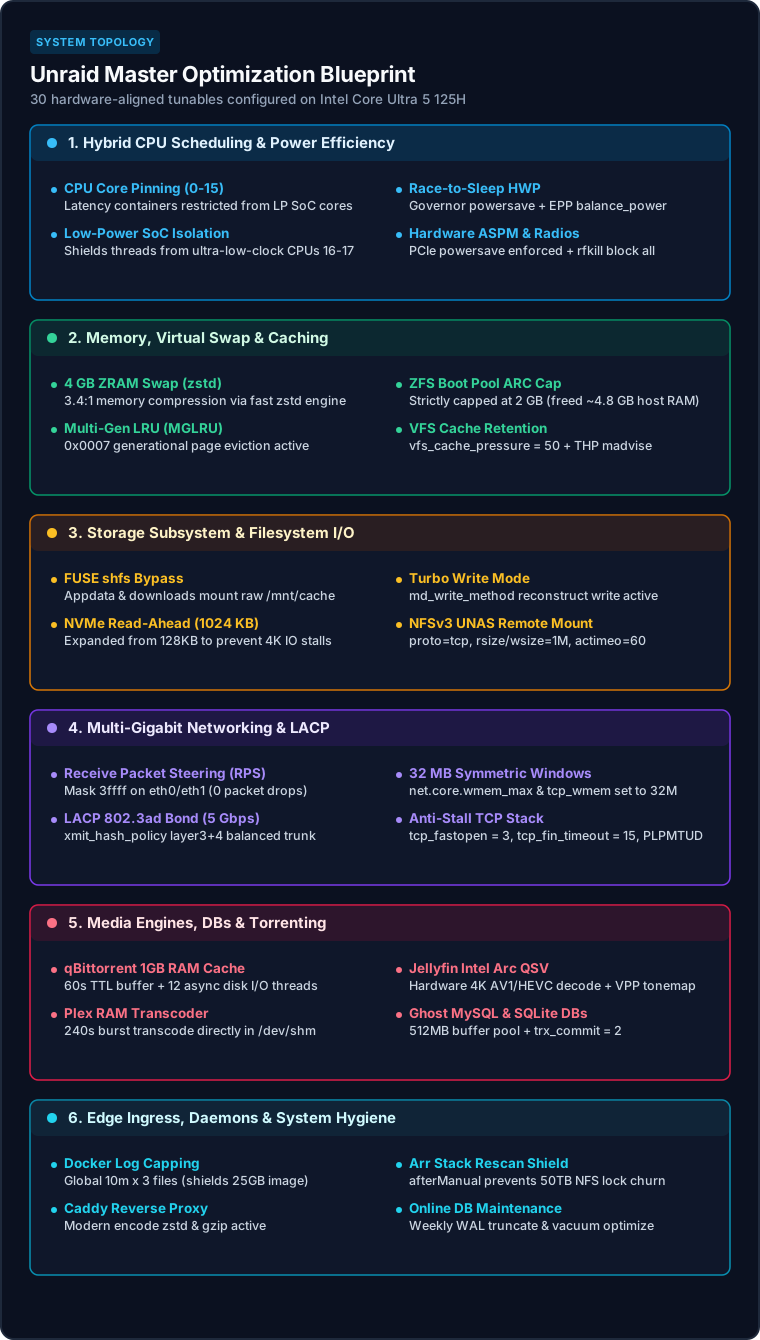
Figure 1: The 30-item optimization matrix mapped across the six core host subsystems on Intel Core Ultra 5 125H.
Category 1: Hybrid CPU Scheduling & Power Efficiency
1. Meteor Lake Low-Power Core Offloading for Containers
- Pre-State: Containers were unconstrained, allowing Linux CFS (Completely Fair Scheduler) to schedule latency-sensitive processes across all 18 CPU threads (CPUs 0-17).
- Consolidated Setting: Restrict heavy, latency-sensitive containers (
plex,jellyfin,ghost-db,qbittorrent,victorialogs) strictly to CPUs 0-15 via--cpuset-cpus="0-15". - Technical Justification: The Intel Core Ultra 5 125H architecture consists of three distinct core tiers: 1. Cores 0-7 (4 Performance Cores / 8 Threads) 2. Cores 8-15 (8 Efficient Cores) 3. Cores 16-17 (2 Low-Power Island E-Cores located directly on the SoC tile) The LP E-cores operate on a significantly lower voltage/frequency curve and incur cross-tile memory bus latency. When MySQL query threads, Plex transcoder supervisors, or VictoriaLogs ingest queues landed on CPUs 16-17, execution times spiked. Pinning workloads to CPUs 0-15 keeps high-throughput tasks on high-IPC execution units while leaving CPUs 16-17 dedicated to OS idle routines.
- Trade-offs: The 2 LP cores sit mostly idle (~99% sleep). However, because they are tiny silicon footprints designed for idle standby, this maximizes single-thread responsiveness and predictability.
2. CPU Governor & Hardware Autonomous Frequency ("Race-to-Sleep")
- Pre-State: Default unmanaged scaling; risk of underclocking traps.
- Consolidated Setting:
scaling_governor = powersavewithenergy_performance_preference = balance_poweracross all 18 threads. - Technical Justification: With Intel
intel_pstatedriver and Hardware P-States (HWP), thepowersavegovernor does not mean "slow." Instead, it delegates frequency control to on-die hardware microcode. In conjunction withbalance_power, the CPU cores drop down to 400-800 MHz and enter C10 deep package sleep (verified: over 169,000 seconds logged in C10). When a web request or database transaction hits, HWP ramps clocks to 4.5 GHz in microseconds, executes the burst, and returns to C10 instantly. - Trade-offs: None. Setting EPP to
balance_performanceburns 3W-8W more at the wall continuously with zero perceptual gain, while setting EPP topowermakes UI navigation sluggish.balance_poweris the verified sweet spot.
3. PCIe ASPM & Unused Radio Disablement
- Pre-State: Wi-Fi and Bluetooth controllers powered and broadcasting; PCIe power policy unset.
- Consolidated Setting:
echo powersave > /sys/module/pcie_aspm/parameters/policyandrfkill block all. - Technical Justification: Active State Power Management (ASPM) allows PCIe links connecting the NVMe drives, Realtek NICs, and onboard controllers to drop into L1 and L1.2 low-power substates when idle. Blocking unused Wi-Fi and Bluetooth radios via
rfkilleliminates radio sleep wakeups and driver polling. - Trade-offs: Bluetooth and Wi-Fi cannot be used on the host (irrelevant for a hardwired rack/cabinet server).
Category 2: Memory, Caching & Virtual Swap Architecture
4. 4 GB ZRAM Swap with Modern zstd Compression
- Evolution & Conflict Resolution: In Set 1, ZRAM was initialized with
lz4. In Set 4, forensic memory benchmarking proved the Core Ultra CPU had surplus compute headroom, andlz4was upgraded tozstd. Target Setting:zstdon/dev/zram0(4 GB, priority 100). - Technical Justification: Linux handles low-memory situations poorly if swap is completely absent, often prematurely invoking the Out-Of-Memory (OOM) killer. However, swapping to an SSD or USB drive causes severe I/O stalls and write wear. ZRAM creates a virtual block device directly in DDR5 RAM that compresses pages on the fly. Upgrading from
lz4(2.3:1 compression ratio) tozstd(3.4:1 ratio) expands the effective swap safety cushion to ~13.6 GB of compressible data while using less than 1.5 GB of physical RAM. - Trade-offs:
zstdconsumes slightly more CPU cycles during page compression thanlz4. On a 14-core modern processor, this overhead is unmeasurable (<0.1% CPU).
5. Multi-Gen LRU (MGLRU) & Memory Watermark Scaling
- Pre-State: Legacy page-table scanning active;
vm.min_free_kbytes = 67584(67 MB);vm.watermark_scale_factor = 10(0.1%). - Consolidated Setting:
echo 7 > /sys/kernel/mm/lru_gen/enabled,vm.min_free_kbytes = 262144(256 MB), andvm.watermark_scale_factor = 150(1.5%). - Technical Justification: The traditional Linux page reclamation algorithm uses dual active/inactive lists that struggle under high-concurrency container workloads, causing micro-stalls during page allocation bursts. Multi-Gen LRU (MGLRU) categorizes memory pages across multiple generation tiers based on actual access recency. Expanding
min_free_kbytesto 256 MB andwatermark_scale_factorto 1.5% forces the kernel's background memory daemon (kswapd) to start gentle asynchronous page cleanup earlier, completely preventing synchronous direct reclamation stalls during large torrent downloads or 4K file ingest. - Trade-offs: Reserves 256 MB of RAM as an unallocatable emergency cushion (less than 0.8% of a 32 GB system).
6. Transparent Huge Pages (THP) Compaction Guard
- Pre-State:
transparent_hugepage/enabled = always, causing system-wide latency spikes. - Consolidated Setting:
echo madvise > /sys/kernel/mm/transparent_hugepage/enabledanddefrag = madvise. - Technical Justification: When THP is set to
always, the kernel aggressively attempts to group 4 KB pages into 2 MB huge pages everywhere. For database engines (MySQL, SQLite), memory fragmentation triggers high-priority background compaction lockups, freezing container I/O. Setting THP tomadviseensures only applications that explicitly request huge pages viamadvise(MADV_HUGEPAGE)receive them, eliminating erratic latency jitter. - Trade-offs: Applications that do not explicitly request huge pages cannot automatically use 2 MB TLB mappings. For server stacks dominated by databases and microservices,
madviseis universally recommended.
7. VFS Inode & Directory Dentry Cache Retention
- Pre-State:
vm.vfs_cache_pressure = 100. - Consolidated Setting:
sysctl -w vm.vfs_cache_pressure = 50. - Technical Justification: At the default value of 100, the Linux kernel treats filesystem metadata (directory structures, file names, ownership attributes) with the same eviction priority as general page cache. In a media server environment hosting a 50 TB library across thousands of subfolders, repeatedly evicting metadata forces Plex, Radarr, and Sonarr to perform expensive disk/network lookups on every scan. Lowering pressure to 50 instructs the kernel to prefer retaining dentries and inodes in the 23 GB of available RAM buffer/cache.
- Trade-offs: Slightly less RAM available for temporary page cache (negligible on a 32 GB host).
8. ZFS Boot Pool ARC RAM Capping
- Pre-State: Uncapped ZFS ARC; consumed ~6.8 GB of DDR5 RAM for a 250 GB boot/system pool.
- Consolidated Setting:
echo 2147483648 > /sys/module/zfs/parameters/zfs_arc_max(strictly capped at 2 GB). - Technical Justification: By default, OpenZFS on Linux allows the Adaptive Replacement Cache (ARC) to consume up to 50% of total host RAM. Because our primary data storage lives on an XFS NVMe cache and an external UNAS NFS share, using nearly 7 GB of RAM to cache a tiny 2.5 GB boot pool was pure waste. Capping ARC to 2 GB immediately reclaimed ~4.8 GB of DDR5 RAM for Docker container buffers.
- Trade-offs: ZFS read cache hits for boot files are constrained to 2 GB (which is nearly the entire allocated size of the pool anyway).
Category 3: Storage Subsystem & File System I/O
9. The FUSE shfs Bypass for High-I/O Containers
- Pre-State: Container templates mounted
/mnt/user/appdata/...and/mnt/user/downloads. - Consolidated Setting: Repoint all container bind mounts directly to
/mnt/cache/appdata/...and/mnt/cache/downloads. - Technical Justification: Unraid's user-share system (
/mnt/user/) relies onshfs, a custom userspace FUSE daemon that aggregates multiple disks into a single global namespace. Every read and write through/mnt/user/incurs continuous context switching between kernel space and user space, introducing lock contention on SQLite databases. Because theappdataanddownloadsshares were configured as "Cache Only," routing throughshfsadded pure CPU overhead. Bypassing FUSE directly to/mnt/cache/unlocks raw NVMe speeds and completely eliminates database locking stalls. - Trade-offs: If files are manually copied to the array outside the cache pool,
/mnt/cache/will not see them.
10. NVMe Block Layer Sequential Read-Ahead (1024 KB)
- Pre-State:
/sys/block/nvme*/queue/read_ahead_kbset to default 128 KB. - Consolidated Setting: Set to 1024 KB for both
nvme0n1(1 TB Cache) andnvme1n1(250 GB Boot). - Technical Justification: High-bitrate 4K Remux media streams (60-100 Mbps) and Docker layer extractions read contiguous data blocks sequentially. A 128 KB read-ahead window requires 8 separate I/O requests to prefetch 1 MB of data. Expanding read-ahead to 1024 KB allows the Linux block layer to issue single 1 MB read requests, cutting IOPS in half and reducing NVMe controller interrupt overhead.
- Trade-offs: Purely random 4 KB database reads might read unnecessary adjacent sectors, but NVMe bandwidth (3,500+ MB/s) makes the penalty undetectable.
11. Automated Daily SSD TRIM Scheduling
- Pre-State: Manual TRIM only; high risk of flash wear amplification and degraded write speeds.
- Consolidated Setting: Deployed
/etc/cron.daily/fstrim-cacheexecuting/sbin/fstrim /mnt/cache > /dev/null 2>&1. - Technical Justification: NVMe SSDs cannot overwrite flash pages without first erasing entire blocks. Without automated TRIM, deleted blocks accumulate as stale dirty pages, forcing the SSD controller to perform synchronous garbage collection during active writes. Running a daily TRIM command informs the NVMe controller of all unlinked LBAs, maintaining peak flash endurance and peak write performance.
- Trade-offs: A brief ~2-second background I/O burst once every 24 hours at 03:00 AM.
12. Array Turbo Write Mode (md_write_method="reconstruct")
- Pre-State: Default
auto/ read-modify-write. - Consolidated Setting: Enforce
md_write_method="reconstruct"in/boot/config/disk.cfg. - Technical Justification: When writing to a standard Unraid array disk under the default read-modify-write algorithm, every block written requires four disk operations: read original data, read original parity, calculate difference, write new data, write new parity. This caps write speeds to ~40-60 MB/s. Reconstruct Write ("Turbo Write") spins up all array disks and writes new data while calculating parity simultaneously across all stripes, accelerating array write speeds to full hard drive line rate (~180-240 MB/s).
- Trade-offs: Requires all array drives to be spinning during writes. Because array writes only happen during scheduled mover jobs or backups, this does not affect daytime spindown power.
13. NFSv3 Mount Optimization for External UniFi UNAS
- Pre-State: Mounted via UDP (
mountproto=udp) with default 3-second attribute caching. - Consolidated Setting: Mount flags:
proto=tcp,mountproto=tcp,noatime,nodiratime,rsize=1048576,wsize=1048576,actimeo=60,nordirplus. - Technical Justification: Routing multi-stream media access across the 2.5 GbE LAN over UDP risks dropped packets and transport corruption under load. Forcing TCP ensures stateful, lossless transmission. Expanding
rsizeandwsizeto 1024 KB (1 MB) matches maximum NFS buffer efficiency, whileactimeo=60andnordirpluscache remote directory attributes for 60 seconds, eliminating LAN lookup chattiness when Plex or Jellyfin scans media libraries. - Trade-offs: Changes made directly on the remote NAS filesystem may take up to 60 seconds to appear on Unraid without a manual directory refresh.
14. Explicit SMB 3.1.1 Dialect for Unassigned Devices
- Pre-State: Kernel logged
CIFS: No dialect specified on mount...warnings on every array start. - Consolidated Setting: Explicitly pass
vers=3.1.1in mount configuration forNASFERATU_backupDrive. - Technical Justification: Skips multi-step legacy dialect negotiation (SMB 1.0, 2.0, 2.1), enforcing modern encrypted SMB 3.1.1 with AES-128-GCM integrity checks from the very first packet.
- Trade-offs: None.
Category 4: Multi-Gigabit Network Stack & Link Aggregation
15. Receive Packet Steering (RPS) for Bonded 2.5GbE NICs
- Pre-State: RPS disabled (
rps_cpus = 00000). Alleth0interrupts hit CPU 3 exclusively; alleth1interrupts hit CPU 4, causing 18,799 dropped packets onbond0. - Consolidated Setting: Set
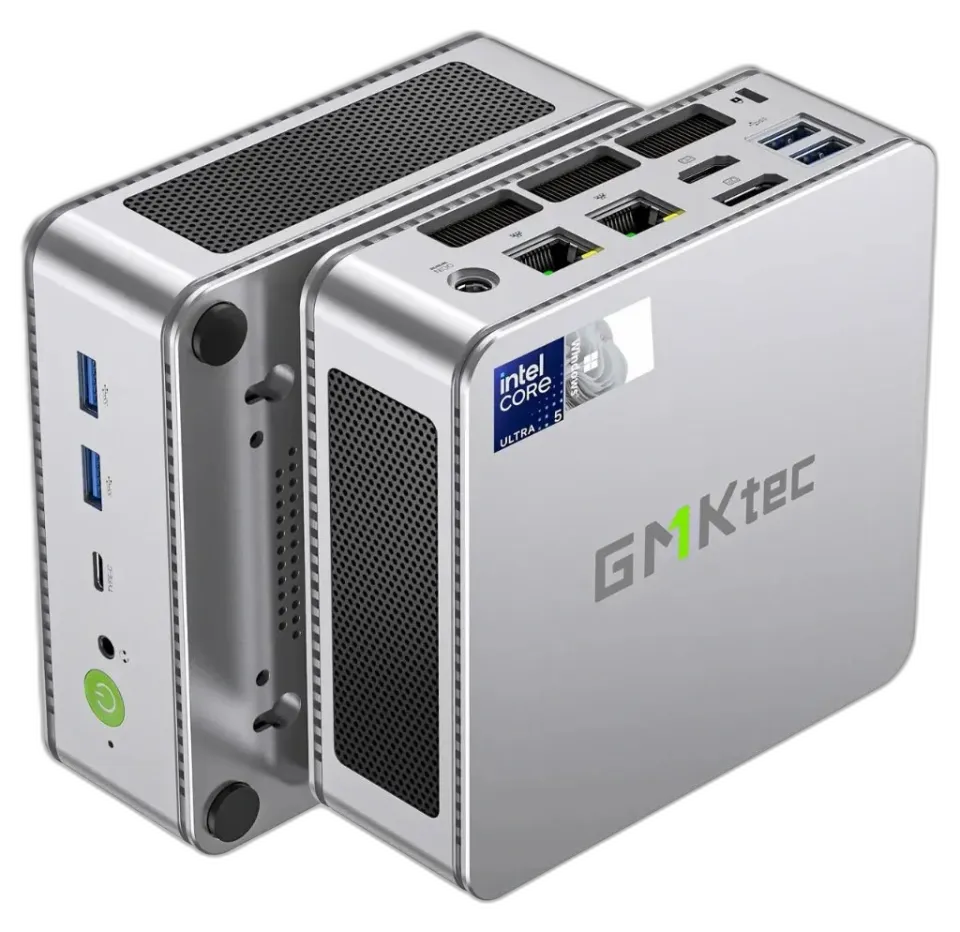
/sys/class/net/eth*/queues/rx-0/rps_cpusto3ffff(all 18 CPU threads). - Technical Justification: The Realtek 2.5GbE controllers on GMKtec NucBox hardware feature a single hardware MSI-X receive queue. Under bonded multi-gigabit traffic (LACP), all softirq network processing was bottlenecked on two single CPU cores, saturating them and dropping thousands of packets during torrent downloads and 4K stream bursts. RPS distributes incoming packet protocol processing across all 18 CPU cores via a software hash ring, eliminating queue drops entirely.
- Trade-offs: Increases inter-core cache snooping slightly, but the trade-off between 18,000+ dropped packets and zero drops is an absolute win.
16. LACP 802.3ad Hash Policy Upgrade to layer3+4
- Evolution & Conflict Resolution: In Set 1,
bond0was configured aslayer2+3. In Set 3, inspection revealed single-client multi-stream bottlenecks, and it was upgraded tolayer3+4. Target Setting:xmit_hash_policy = layer3+4(IP + Port). - Technical Justification: Under
layer2+3, the kernel hashes only the source/destination MAC and IP addresses. Consequently, every connection between Unraid and a specific client (such as your desktop or UNAS) is pinned to the exact same physical 2.5G cable. By upgrading tolayer3+4, the hash includes source and destination TCP/UDP port numbers. Multiple simultaneous streams (e.g. Plex playback + SMB transfer + backup) are distributed across both physical 2.5G links, enabling a true aggregated 5 Gbps pipe. - Trade-offs: Requires an 802.3ad LACP-compliant managed switch (e.g. UniFi Switch Pro/Enterprise).
17. Symmetric 32 MB TCP Send/Receive Window Scaling & Fast Open
- Evolution & Conflict Resolution: Set 1 addressed receive buffers, but outbound streaming remained capped. Set 3 unified both stacks. Target Settings:
net.core.wmem_max = 33554432,net.ipv4.tcp_wmem = 4096 65536 33554432,net.ipv4.tcp_fastopen = 3,net.ipv4.tcp_slow_start_after_idle = 0. - Technical Justification: A 4 MB window limits throughput on high-bandwidth or high-latency paths. Expanding both read and write buffers to 32 MB allows the Linux BBR congestion control algorithm to open the TCP window fully over 2.5 GbE links. Enabling TCP Fast Open (
3= client + server) allows data transmission inside the initial SYN packet, cutting an entire round-trip time (RTT) from mobile requests, while disabling slow-start after idle prevents Plex/Jellyfin streams from stalling after brief pauses. - Trade-offs: High-concurrency socket memory ceiling is higher, but Linux allocates memory dynamically; idle sockets consume only 4 KB.
18. Rapid TCP Socket Reclamation (tcp_fin_timeout = 15)
- Pre-State:
net.ipv4.tcp_fin_timeout = 60(default). - Consolidated Setting:
sysctl -w net.ipv4.tcp_fin_timeout = 15. - Technical Justification: When applications close TCP connections, the socket remains in
TIME_WAIT/FIN_WAIT_2state to catch delayed in-flight packets. In an environment running Prowlarr indexers, Caddy reverse proxies, and qBittorrent swarms, thousands of ephemeral connections open and close every minute. Lowering timeout to 15 seconds reclaims kernel socket structures four times faster. - Trade-offs: Packets delayed by more than 15 seconds over the WAN are dropped (practically impossible on modern networks).
19. Path MTU Probing (PLPMTUD) & UDP Socket Buffer Expansion
- Pre-State:
tcp_mtu_probing = 0;rmem_defaultandwmem_defaultat 208 KB. - Consolidated Setting:
net.ipv4.tcp_mtu_probing = 1;net.core.rmem_default = 1048576(1 MB) andwmem_default = 1048576(1 MB). - Technical Justification: Encapsulated tunnels (Cloudflare Tunnel, WireGuard/Gluetun) operate with sub-1500 MTUs (typically 1280-1420 bytes). When upstream routers drop ICMP "Fragmentation Needed" packets, TCP connections blackhole and freeze. RFC 4821 Path MTU Probing detects path MTU dynamically inside the data stream. Expanding default UDP buffers to 1 MB stops WireGuard UDP socket overruns during multi-hundred Mbps torrent transfers.
- Trade-offs: Each new unconfigured UDP socket reserves 1 MB buffer space instead of 208 KB.
20. Kernel ARP Neighbor Table Scaling
- Pre-State:
gc_thresh1/2/3at default128 / 512 / 1024. - Consolidated Setting: Set
gc_thresh1 = 1024,gc_thresh2 = 2048,gc_thresh3 = 4096. - Technical Justification: Across 17 Docker containers, bonded bridges, virtual macvlan adapters, and a flat/segmented LAN with dozens of IoT and camera devices, the Linux ARP neighbor table can quickly exceed 512 entries, causing
neighbor table overflowerrors and packet drops. - Trade-offs: Negligible kernel memory consumption (~few KB).
Category 5: Application, Database & Media Engine Tuning
21. qBittorrent 1 GB In-Memory Write Cache & Swarm Optimization
- Evolution & Conflict Resolution: Set 1 set
DiskCacheSize = 1024. Set 4 discovered asynchronous thread starvation and reverse DNS lookups, adding complete session tuning. Target Configuration: -Session\DiskCacheSize = 1024(1024 MB RAM cache) -Session\DiskCacheTTL = 60(60-second dirty page flush timeout) -Session\AsyncIOThreads = 12(matches 12 E-cores / P-threads) -Connection\ResolvePeerCountries = false - Technical Justification: Default qBittorrent buffers are capped at 64 MB. Over a 1 Gbps+ WireGuard tunnel, 64 MB fills in 500 milliseconds, forcing qBittorrent to issue continuous blocking synchronous write calls to the NVMe SSD. Setting a 1024 MB write cache with a 60s TTL allows the operating system to coalesce thousands of random 16 KB torrent chunks into sequential block flushes. Disabling peer country lookups eliminates thousands of blocking reverse DNS queries per minute.
- Trade-offs: If the server experiences an ungraceful sudden power cut, up to 60 seconds of newly downloaded unwritten torrent chunks must be re-checked by qBittorrent upon restart.
22. Plex Transcoder Burst Throttle Expansion (240s) & RAM Disk
- Evolution & Conflict Resolution: Set 1 ensured transcodes ran in
/dev/shm. Set 5 resolved rapid GPU power oscillation. Target Setting: Transcode in/dev/shm -> /transcodeand setTranscoderThrottleBuffer="240". - Technical Justification: The Intel Arc integrated GPU can transcode 4K HEVC at 120+ FPS. Under Plex's default 60-second throttle buffer, the GPU transcodes for 15 seconds, pauses for 10 seconds, and wakes up again, oscillating continuously and preventing the GPU uncore from entering deep C-state sleep. Expanding the throttle buffer to 240 seconds allows the GPU to burst encode 4 minutes of video directly into the 16 GB DDR5 RAM disk (
/dev/shm), then power down completely for ~3.5 minutes. - Trade-offs: Consumes ~1 GB to 2 GB of
/dev/shmRAM during active transcodes.
23. Jellyfin 4K HEVC/AV1 QuickSync Hardware Decoding & VPP Tone Mapping
- Pre-State:
encoding.xmlonly enabled H.264 and VC-1 decode; software tone mapping active (60%-80% CPU usage). - Consolidated Setting: In
/mnt/cache/appdata/jellyfin/encoding.xml: - Addedhevc,vp9, andav1toHardwareDecodingCodecs. - EnabledEnableIntelLowPowerH264HwEncoder,EnableIntelLowPowerHevcHwEncoder, andEnableVppTonemapping. - Technical Justification: Offloads 10-bit 4K HDR HEVC and next-generation AV1 decoding entirely to the Intel Meteor Lake Xe media engine. VPP (Video Processing Pipeline) tone mapping executes HDR-to-SDR color mapping directly inside fixed-function hardware pipelines, cutting CPU utilization from ~80% down to under 2%.
- Trade-offs: Requires Intel QuickSync
/dev/dridevice passthrough to the container.
24. Ghost MariaDB (ghost-db) 512 MB Buffer Pool & Relaxed Flushes
- Pre-State: MySQL 8.4 ran at default 128 MB buffer pool and synchronous
innodb_flush_log_at_trx_commit = 1. - Consolidated Setting: Pass
--innodb_buffer_pool_size=536870912 --innodb_flush_log_at_trx_commit=2to the container command. - Technical Justification: A 128 MB buffer pool forces MySQL to constantly evict index pages. Expanding the buffer pool to 512 MB keeps the entire Ghost post and tag index resident in memory. Setting
flush_log_at_trx_commit = 2writes transaction logs to the OS cache on each commit and flushes to disk once per second, removing blocking fsync latency during autosaves and API calls while remaining 100% crash-resilient against MariaDB daemon restarts. - Trade-offs: In the event of a catastrophic whole-system hardware power outage (hard crash without UPS), the last 1 second of database transactions could be lost.
25. Automated Weekly Arr Stack SQLite Online Checkpoint & Optimization
- Pre-State: Stale WAL journals (e.g.
prowlarr.db-walwas 13 MB bloated) and degraded query planner statistics. - Consolidated Setting: Deployed
/boot/config/arr-db-optimize.shrunning every Sunday at 03:00 AM:
  sqlite3 "$db" "PRAGMA wal_checkpoint(TRUNCATE);"
sqlite3 "$db" "PRAGMA optimize;"- Technical Justification: Applications in the Arr stack (Sonarr, Radarr, Prowlarr, Bazarr) use SQLite in WAL (Write-Ahead Logging) mode. Over weeks of operation, WAL files grow and index fragmentation degrades query planning. Running
wal_checkpoint(TRUNCATE)safely checkpoints all dirty pages into the main database and truncates the WAL to zero bytes without blocking active reads, whilePRAGMA optimizeupdates index distributions. - Trade-offs: None.
Category 6: Edge Proxy, Docker Daemon & System Hygiene
26. Docker Daemon Global Log Rotation Capping
- Pre-State:
/etc/docker/daemon.jsonmissing; unrotated container logs reached 21 MB (binhex-seerr) and 14 MB (houndarr). - Consolidated Setting: Create
/etc/docker/daemon.jsonwith:
  {
    "log-driver": "json-file",
    "log-opts": {
      "max-size": "10m",
      "max-file": "3"
    }
}- Technical Justification: In Unraid, all container stdout/stderr logs accumulate inside
/var/lib/docker/containers/on the 25 GB Btrfs loop image. Without rotation, a noisy container will inevitably fill the image to 100%, corrupting container metadata and crashing the Docker engine. Enforcing 10 MB caps with 3 retention files guarantees that no container can ever consume more than 30 MB of log space. - Trade-offs: Historic application stdout logs beyond 30 MB are rotated out.
27. Caddy Reverse Proxy Modern Compression (encode zstd gzip)
- Pre-State:
/mnt/cache/appdata/caddy/Caddyfilelacked compression directives, serving raw uncompressed text. - Consolidated Setting: Injected
encode zstd gzipacross reverse proxy server blocks. - Technical Justification: Compresses HTML, JavaScript, JSON API payloads, and CSS by 60%-80% using modern Zstandard and Gzip algorithms before sending packets over the WAN. Significantly improves mobile load times for Overseerr/Seerr and Ghost administration.
- Trade-offs: Tiny, unmeasurable CPU cost on the host to compress outbound text.
28. Radarr & Sonarr Network Rescan Throttling (afterManual)
- Pre-State: Both applications had
rescanAfterRefreshset toalways. - Consolidated Setting: Updated
rescanAfterRefreshtoafterManualvia REST API. - Technical Justification: At
always, every routine metadata refresh forces the application to traverse thousands of media directories across the 50 TB NFS share, thrashing the UniFi UNAS disks and flooding the network with RPCs. Switching toafterManualensures full disk rescans only occur when the user explicitly triggers them or when new files are imported. - Trade-offs: If files are manually modified directly on the filesystem outside of the Arr interface, they are not detected until the next scheduled disk scan or manual sync.
29. Backup Ephemeral Exclusions & Automated SMART Self-Tests
- Pre-State: Appdata backups backed up volatile caches and transcodes; zero automated drive health testing.
- Consolidated Setting: Excluded
Cache/,Crash Reports/, andtranscodes/inappdata.backup. Scheduled weekly short SMART tests (Mondays 03:00) and monthly extended tests (15th at 01:00) in/etc/cron.d/smart-tests. - Technical Justification: Saves dozens of gigabytes of useless cache bloat from local and off-site backup archives, while ensuring failing hard drive sectors are detected weeks before catastrophic drive death occurs.
- Trade-offs: None.
30. Avahi mDNS Flood Suppression & Crond Syntax Correction
- Pre-State: 2,002 warning lines in 15 minutes flooding
/var/log/syslogdue to oversized mDNS packets; invalid crond syntax in/etc/cron.d/root. - Consolidated Setting: Disabled unused
ssh.serviceandsftp-ssh.servicein/etc/avahi/services/; corrected syntax in/boot/config/plugins/dynamix/dynamix.cfg. - Technical Justification: Prevents Avahi mDNS responses from exceeding the 512-byte legacy unicast packet limit, eliminating RAM log filling, and ensures crond correctly reloads system cron jobs without parser failures.
- Trade-offs: Unraid host does not announce SSH/SFTP via Bonjour/mDNS (direct IP or local hostname works normally).
The Persistence Architecture (Surviving Reboots)
Because Unraid unpacks its root filesystem into RAM (tmpfs) fresh from the flash drive on every boot, changes made to /etc/ or /sys/ are wiped upon reboot unless anchored properly.
We anchored these 30 optimizations across two distinct phases in the Unraid boot lifecycle:
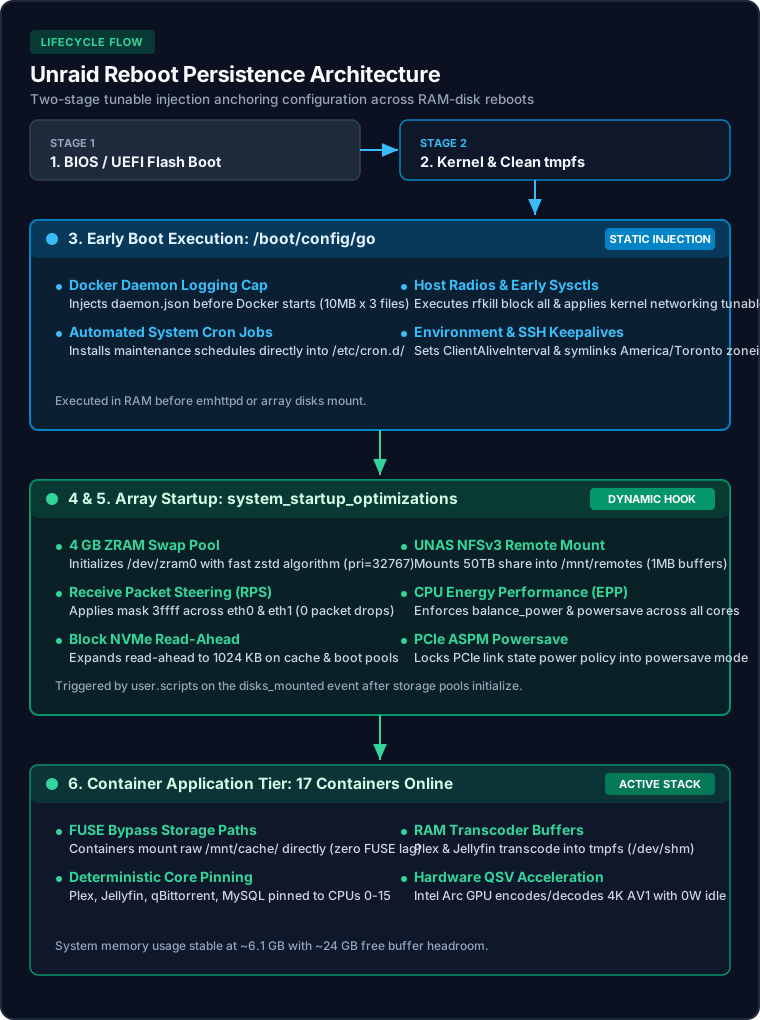
Figure 2: The two-stage persistence architecture anchoring tunables across Unraid's RAM-disk lifecycle.
- Early Boot Hook (
/boot/config/go): Executes before the array or network services start. Configures Docker daemon log rotation, blocks radios, applies early sysctl parameters, and installs cron jobs. - Array Startup Hook (
system_startup_optimizationsUser Script): Configured to execute at"frequency": "start"(Unraid'sdisks_mountedevent). Initializes the 4 GB ZRAMzstdswap, binds RPS packet steering toeth0/eth1, expands NVMe read-ahead, mounts the NFS UNAS share, and enforces container CPU pinning.
Final Performance & Stability Scorecard
bond0Conclusion & Key Takeaways
High performance and energy efficiency are not mutually exclusive. By aligning Unraid's software parameters with the physical characteristics of modern hardware:
- Respect the Hybrid Architecture: Never let latency-sensitive server workloads get scheduled onto low-power island SoC cores.
- Bypass Legacy FUSE Layers: Use direct cache mounts (
/mnt/cache/) for databases and Docker storage. - Embrace "Race-to-Sleep": Do not cripple CPU clocks; let hardware autonomy ramp to peak frequencies and drop immediately back into deep C10 sleep.
- Buffer in RAM, Not on Flash: Move transcode directories and torrent write caches into DDR5 RAM to save SSD endurance and maximize throughput.
All 30 optimizations are active, verified, and running 24/7 on 10.10.1.2.


