From Unraid XML Templates to Production Docker Compose: The Definitive Infrastructure-as-Code Blueprint
Executive Summary & Architectural Rationale
Unraid’s Docker implementation is famous for its ease of use. Through the Community Applications (CA) catalog, users can click an icon, fill out a web form, and launch a container within seconds. Behind the scenes, Unraid stores these container definitions as XML templates inside /boot/config/plugins/dockerMan/templates-user/. Whenever a container starts or updates, Unraid reads the XML and dynamically synthesizes an expansive docker run shell command.
For single, standalone containers, this model is undeniably convenient. But as a homelab scales into an interconnected production environment—spanning media streaming, automated acquisition pipelines, public-facing reverse proxies, centralized log aggregators, and relational database backends—the Unraid XML template model collapses under its own architectural constraints:
- Configuration Drift & Opaque State: XML templates are loosely coupled to running containers. Tweaking a parameter in the WebUI generates an ad-hoc
docker runcommand with dozens of command-line flags. There is no Git version control, no PR review workflow, and no clean diffing mechanism. - Absence of Multi-Container Orchestration: Real-world services rarely run in isolation. A Ghost publishing platform requires a tightly coupled MySQL 8 database; a BitTorrent client requires an uncompromising VPN tunnel with healthchecked killswitches; an automated subtitle downloader (
bazarr) is useless until Sonarr and Radarr APIs are operational. Unraid templates treat every container as an island, with zero native dependency gating or shared life-cycle management. - The Brittle Network Namespace Trap: Routing traffic from multiple containers through a WireGuard VPN container (like Gluetun) in standard Unraid requires brittle workarounds: injecting
--net=container:gluetuninto "Extra Parameters", manually declaring all forwarding ports on the Gluetun template, and praying that Gluetun boots before its client containers. If Gluetun crashes or restarts, its dependent containers are severed and fail silently. - The FUSE
shfsPerformance & Lock Penalty: Community templates often encourage default path mappings such as/mnt/user/appdata/.... User shares route through Unraid’s userspace FUSE daemon (shfs), which introduces severe context-switching overhead and breaks POSIX file-locking semantics on SQLite databases (the storage engine powering Sonarr, Radarr, Prowlarr, and Plex).
To eliminate configuration drift, enforce strict startup dependency graphs (DAGs), secure our network boundaries, and bring true Infrastructure-as-Code (IaC) to our Unraid host, we migrated all 17 production containers into 4 consolidated Docker Compose stacks managed via the Unraid compose.manager plugin.
This blueprint details the architectural rationale, technical benefits, honest trade-offs, update workflows, disaster recovery integration, and the fully obfuscated production manifests powering our server.
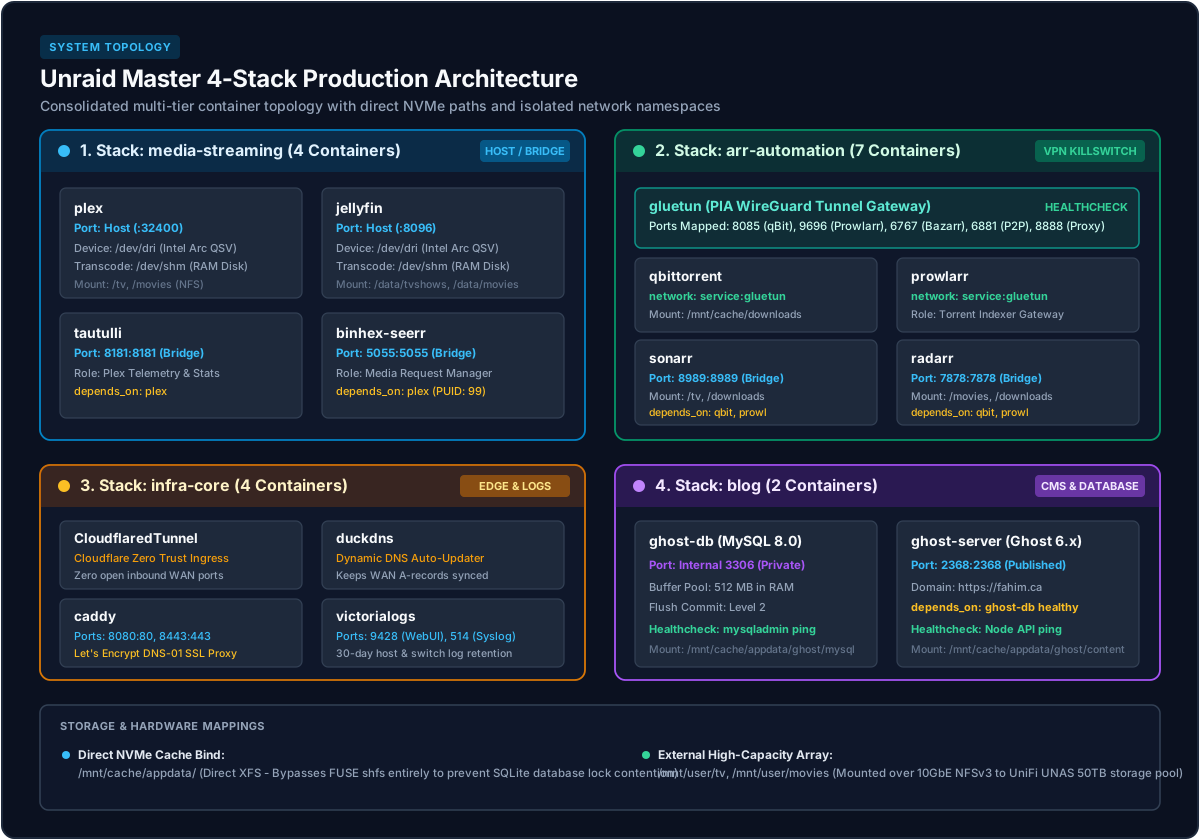
The Master 4-Stack Architecture
Rather than maintaining a chaotic list of 17 independent containers, our services are partitioned into four cohesive domain stacks. Each stack lives in its own directory on the high-speed NVMe SSD cache at /mnt/cache/appdata/compose/<stack>/:
The Master Startup Dependency Graph (DAG)
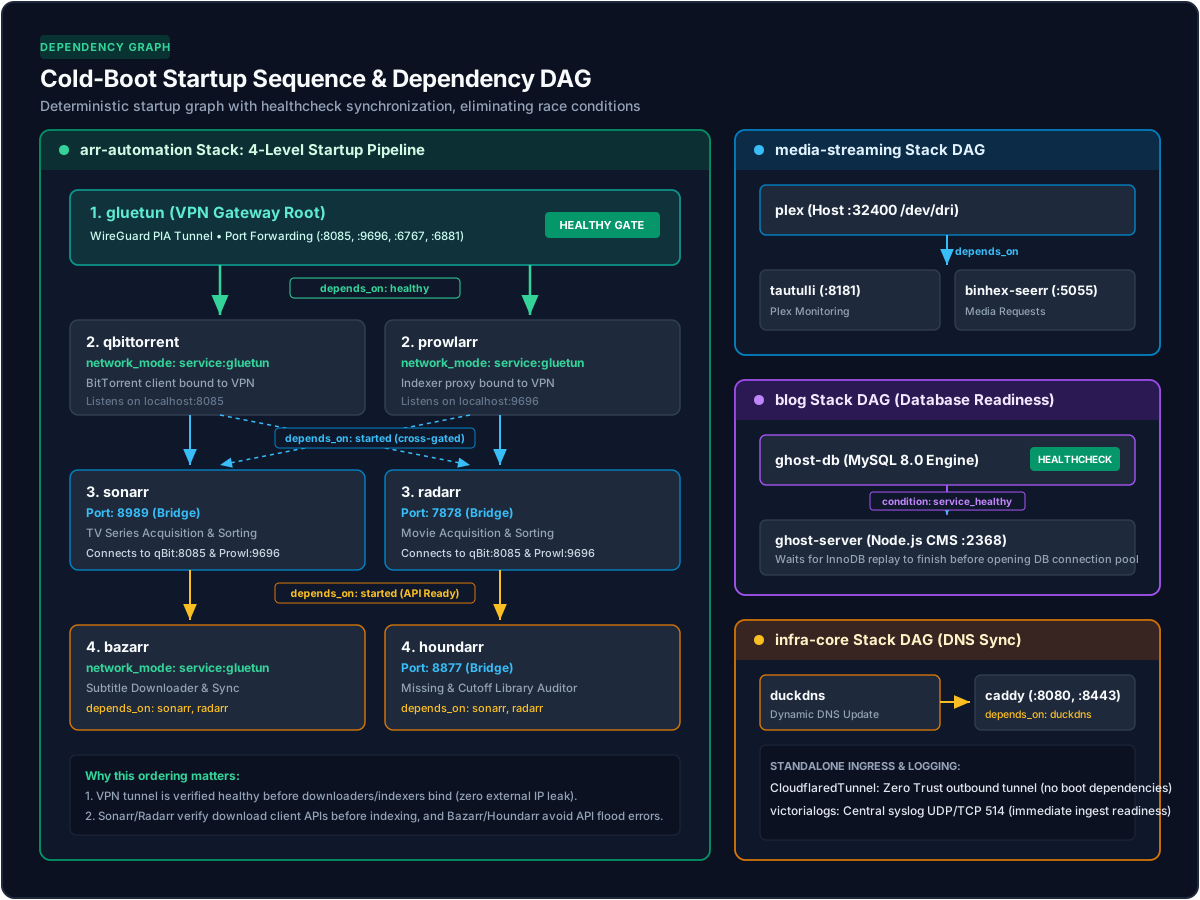
In an unmanaged Unraid Docker environment, containers boot concurrently when the Docker daemon starts. This creates race conditions where client containers query uninitialized VPN tunnels, databases, or companion APIs. Under Docker Compose, each stack declares an explicit Directed Acyclic Graph (DAG) of dependencies:
Architectural Deep Dive: The 4 Production Stacks
1. media-streaming (4 Containers)
- Components:
plex,jellyfin,tautulli,binhex-seerr - Network Mode:
hostfor Plex and Jellyfin (mandatory for zero-overhead DLNA, GDM local subnet broadcast, and low-latency LAN playback); bridge for Tautulli and Seerr. - Hardware Acceleration: Full pass-through of the Intel Arc GPU via
/dev/dri:/dev/drito both Plex and Jellyfin. Intel QuickSync Video (QSV) transcode pipelines execute in hardware without container contention. - Startup Ordering: Tautulli and Overseerr declare
depends_on: [ plex ]. They do not initialize until the media server is up, preventing socket connection errors during system boot. - Transcode Scratches: Mounted directly to RAM via
/dev/shm:/transcodeto eliminate NVMe SSD write wear during 4K video transcoding bursts.
2. arr-automation (7 Containers)
- Components:
gluetun,qbittorrent,prowlarr,bazarr,sonarr,radarr,houndarr - Coupled VPN Killswitch:
qbittorrent,prowlarr, andbazarrjoin Gluetun's network namespace vianetwork_mode: "service:gluetun". They have no independent virtual network adapters; their external traffic can only exit through Gluetun's WireGuard interface. - Inter-Service Gating:
sonarrandradarrdepend onqbittorrentandprowlarr. In turn,bazarrandhoundarrdepend onsonarrandradarr. This strict DAG eliminates startup race conditions where indexers or subtitle tools probe uninitialized APIs.
Healthcheck DAG Gating: Client containers declare:
depends_on:
  gluetun:
    condition: service_healthy
Gluetun only reports healthy after successfully handshaking with Private Internet Access (PIA) WireGuard servers and obtaining an active port forward. Containers cannot start in a naked, unencrypted network state.
3. infra-core (4 Containers)
- Components:
CloudflaredTunnel,duckdns,caddy,victorialogs - Edge Routing & Ingress: Cloudflare Zero Trust tunnel connects outbound to Cloudflare's global edge network, exposing selected private services without opening inbound firewall ports. DuckDNS maintains our dynamic IP pointer, while Caddy handles internal HTTPS certificates via Let's Encrypt DNS-01 challenges.
- Centralized Observability: VictoriaLogs binds to UDP/TCP port 514, ingesting high-throughput syslog streams across all network switches, UniFi gateways, and Unraid host subsystems with 30-day retention.
- Dependency:
caddydeclaresdepends_on: [ duckdns ]to guarantee dynamic DNS records are refreshed before ACME certificate handshakes execute.
4. blog (2 Containers)
- Components:
ghost-server,ghost-db(MySQL 8)
Database Readiness Guard: Ghost requires an active relational database at launch. If Ghost attempts to connect while MySQL is still running InnoDB replay logs, the Node.js process crashes and enters an unstable restart loop. We enforce deterministic boot via a custom MySQL healthcheck:
healthcheck:
  test: ["CMD", "mysqladmin", "ping", "-h", "localhost", "-u", "root", "-p<MYSQL_ROOT_PASSWORD>"]
  interval: 30s
  timeout: 5s
  retries: 3
  start_period: 30s
ghost-server declares condition: service_healthy on ghost-db, guaranteeing seamless boots.
Preserving the Unraid WebUI Experience (The Magic Labels)
The number one objection homelabbers raise against moving to Docker Compose on Unraid is:
"If I switch to Docker Compose, I will lose my Unraid Docker dashboard icons, the clickable WebUI shortcuts, and my browser terminal buttons."
This is a common misconception. Unraid's Docker WebUI is fully compatible with containers created outside of its legacy XML templates, provided you supply the correct Docker container labels.
When migrating to Compose, you can define these labels directly in your docker-compose.yml or isolate them in a companion docker-compose.override.yml. The Unraid WebUI inspects every running container and renders GUI elements based on the following metadata:
| Label Key | Purpose & Format | Example |
|---|---|---|
net.unraid.docker.icon |
Absolute HTTPS URL to a transparent PNG/SVG logo rendered on the dashboard. | https://raw.githubusercontent.com/linuxserver/docker-templates/master/linuxserver.io/img/sonarr-logo.png |
net.unraid.docker.webui |
Browser endpoint URL for the container dropdown. Supports dynamic replacement tokens: [IP] (host IP) and [PORT:<num>]. |
http://[IP]:[PORT:8989] |
net.unraid.docker.shell |
Determines whether the interactive WebUI console icon spawns bash or sh. |
bash (or sh for Alpine/distroless images) |
net.unraid.docker.managed |
Informs Unraid’s template manager that this container is managed by the Compose plugin, disabling legacy template editing. | composeman |
How Compose Manager Links to Unraid
The Unraid compose.manager plugin acts as a bridge. For each stack created, it places a tiny configuration block on the flash USB at /boot/config/plugins/compose.manager/projects/<stack>/:
name: The stack identifier (e.g.,arr-automation).indirect: An absolute pointer file containing the true path to your Compose directory on the NVMe cache (/mnt/cache/appdata/compose/arr-automation).autostart: A boolean toggle (true/false) dictating whether Unraid launches the stack automatically when the Docker service starts.
Because the YAML files reside on /mnt/cache/appdata/compose/, editing them does not incur write wear on the Unraid boot flash drive. Furthermore, changes made in VS Code or via Git immediately reflect in the Unraid GUI.
Architectural Wins & Hard Engineering Problems Solved
1. Eliminating the FUSE shfs SQLite Lock Contention
In standard Unraid setups, containers frequently map volumes using paths like /mnt/user/appdata/radarr. The /mnt/user/ virtual mount is handled by shfs, a custom userspace FUSE filesystem. While FUSE is great for pooling heterogeneous spinning disks, it introduces substantial latency:
- Every filesystem operation incurs multiple kernel-to-userspace context switches.
- POSIX file-locking primitives are emulated, often failing under rapid multi-threaded read/write bursts.
For applications powered by SQLite databases (Sonarr, Radarr, Prowlarr, Plex, Bazarr), FUSE causes intermittent database lock errors (database is locked / disk I/O error) and UI freezes during large library refreshes.
By migrating to Docker Compose, we standardized all appdata volume binds directly to the NVMe filesystem:
volumes:
  - /mnt/cache/appdata/radarr:/config
This completely bypasses shfs. SQLite accesses the underlying XFS filesystem directly, cutting I/O latency to raw NVMe performance levels (~0.05 ms) and permanently ending database lockups.
2. Coupled VPN Killswitch & Port Forwarding
In our automated acquisition stack, leak prevention is non-negotiable. If qBittorrent downloads a torrent outside the VPN, or if Prowlarr scrapes indexers using our public residential IP, privacy is compromised.
Under legacy Unraid templates, achieving a true killswitch required manual network hacks and offered zero boot synchronization. Under Docker Compose, network coupling is bulletproof:
Client containers bind directly to Gluetun:
network_mode: "service:gluetun"
depends_on:
  gluetun:
    condition: service_healthy
gluetun serves as the network gateway, publishing the required WebUI and BitTorrent listen ports:
ports:
  - "8085:8085"       # qBittorrent WebUI
  - "6881:6881"       # Peer TCP
  - "6881:6881/udp"   # Peer UDP
  - "9696:9696"       # Prowlarr WebUI
  - "6767:6767"       # Bazarr WebUI
If the Gluetun container halts, the network interface disappears. The client containers cannot send a single packet to the outside world. Furthermore, Docker Compose ensures that if Gluetun is restarted, its dependent containers are gracefully restarted alongside it.
3. Hardware Transcoding (Intel QuickSync / Arc GPU)
Under Intel Core Ultra (Meteor Lake) and recent Core architectures, hardware acceleration utilizes the /dev/dri render nodes (renderD128). In Compose, passing this compute node to multiple streaming services is trivial:
devices:
  - /dev/dri:/dev/dri
Both Plex and Jellyfin access the Intel Arc graphics engine concurrently. While Plex serves primary household clients, Jellyfin operates as a backup server, with both sharing the exact same hardware transcoding capabilities without driver contention.
4. Deterministic Startup DAGs: Eliminating Timing & Race Conditions
A critical architectural consideration in multi-container homelabs is timing dependencies: Should automation tools like Sonarr and Radarr wait for media servers like Plex or Jellyfin before booting?
The answer is no:
- Storage Independence: Sonarr and Radarr do not write to Plex; they write directly to persistent network storage (
/mnt/user/tvand/mnt/user/movies). Plex reads from these shares passively or updates via webhook notifications. If Plex is temporarily offline during a media import, files are still placed cleanly on disk without error. - Critical Pipeline Dependencies: Conversely, internal pipeline prerequisites are non-negotiable:
gluetun(WireGuard) must complete its handshake and healthcheck beforeqbittorrentandprowlarrstart. Otherwise, their outbound requests fail or risk leaking through an unprotected interface.qbittorrent&prowlarrmust be listening beforesonarrandradarrinitialize, ensuring download client tests and indexer synchronization succeed on first boot.sonarr&radarrmust be accessible beforebazarr(subtitles) andhoundarr(library health scanner) launch, preventing connection timeouts and API error storms.duckdnsmust register the dynamic host IP beforecaddyinitiates ACME certificate validation handshakes.ghost-dbmust behealthy(MySQL accepting queries) beforeghost-serverconnects, eliminating Node.js boot crash loops.
By structuring these relationships via depends_on and Docker healthchecks, the entire server boots deterministically from cold storage with zero manual intervention.
Honest Trade-offs & Cons: What You Lose
Engineering is about trade-offs. While Docker Compose brings massive stability and DevOps rigor, there are real drawbacks compared to Unraid's default template ecosystem:
1. Loss of Unraid CA "One-Click Update" Buttons
In Unraid's default Docker dashboard, each container displays an "update ready" indicator when a new image tag appears on Docker Hub/GHCR, allowing you to update individual containers with a single click.
- The Reality: For Compose-managed containers, Unraid’s WebUI suppresses or cannot safely execute this one-click update, because doing so would trigger Unraid's legacy
docker runengine and overwrite your Compose network topology. - The Mitigation: Container updates must be performed at the stack level—either via the Compose Manager WebUI ("Update Stack") or via a single CLI command (
docker compose pull && docker compose up -d).
2. Manual Icon & WebUI Curation
In Community Applications, template authors pre-configure icons, web interfaces, and help links. When authoring Compose YAMLs from scratch, you must manually hunt down logo URLs and specify WebUI port tokens ([IP]:[PORT:xxxx]). If you omit the net.unraid.docker.* labels, your containers will appear on the Unraid dashboard with generic grey question marks and no clickable links.
3. The Dual-Autostart Collision Trap
This is the single most dangerous pitfall when migrating an existing Unraid host to Compose.
Unraid maintains its own internal autostart list at /var/lib/docker/unraid-autostart. If you import existing containers into Docker Compose but leave their legacy XML templates configured with Autostart = ON, both Unraid's core daemon and Compose Manager will attempt to start the containers simultaneously upon boot.
- The Symptom: Random port collision errors (
Bind for 0.0.0.0:8085 failed: port is already allocated), orphaned container instances, and broken network bindings. - The Fix: You must explicitly delete the old XML templates from
/boot/config/plugins/dockerMan/templates-user/and ensure legacy containers are fully removed fromdocker ps -abefore handing management over to Compose.
4. Port Visibility Abstraction in Gluetun
Because qbittorrent, prowlarr, and bazarr use network_mode: "service:gluetun", they do not own independent IP or port namespaces. Their port forwards must be declared on the gluetun service block. For newcomers inspecting the YAML, seeing port 8085 (qBittorrent) defined under Gluetun rather than under qBittorrent can be initially counterintuitive.
Update Strategy, Lifecycle & Disaster Recovery
1. The Production Update Workflow
Never update containers blindly in a production environment. With Compose, updates are predictable and atomic.
Method A: The WebUI Route (Compose Manager)
- Navigate to Docker -> Docker Compose in the Unraid WebUI.
- Next to the target stack (e.g.,
media-streaming), click the Gear Icon -> Pull. - Once the new layers download, click Down, followed by Up. The stack restarts cleanly with zero configuration drift.
Method B: The Terminal Route (DevOps CLI)
For engineers who prefer the shell, updates take three commands:
# Navigate to stack directory
cd /mnt/cache/appdata/compose/arr-automation

# Pull latest upstream images
docker compose pull

# Recreate changed containers with zero downtime for unchanged services
docker compose up -d

# Prune dangling images to free SSD cache space
docker image prune -f
2. Disaster Recovery: Integrating with appdata.backup
A common vulnerability in custom Compose setups is forgetting to back up the YAML manifests. If your NVMe SSD dies or the cache pool corrupts, you might restore your container configs from backup only to realize your Compose definitions were lost.
To solve this, we integrated our Compose directories directly into Unraid's official backup utility (Appdata Backup / ca.backup2).
In /boot/config/plugins/appdata.backup/config.json, we configured the includeFiles directive to monitor the Compose directory tree:
{
  "includeFiles": [
    "/mnt/cache/appdata/compose"
  ]
}
How the Backup Executes:
- Every Sunday morning at 03:00,
appdata.backupstops running containers cleanly. - It backs up all
/configdatabases into compressed.tar.zstarchives. - It bundles
/mnt/cache/appdata/compose/intoextra_files.tar.zst. - It restarts all stacks according to their defined startup DAGs.
Full Bare-Metal Recovery:
If our server experienced total drive failure today:
- Boot Unraid and format a replacement NVMe cache pool.
- Restore the latest backup via
appdata.backup.
Run a one-line recovery script:
for stack in infra-core media-streaming blog arr-automation; do
  docker compose -f /mnt/cache/appdata/compose/$stack/docker-compose.yml up -d
done
Within 90 seconds, all 17 containers, their network killswitches, their icons, and their WebUI links are 100% operational.
3. Image Tag Pinning & Rollback Playbook
For mission-critical services like databases and our public CMS, we avoid :latest tags:
ghost-dbis pinned strictly tomysql:8(preventing unwanted major upgrades to MySQL 9).- If an upstream container update introduces a bug (e.g., a Plex transcoder regression), rolling back takes seconds:
- Execute
docker compose up -d. Compose recreates only the downgraded container.
- Execute
Edit docker-compose.yml to specify the previous known-good tag:
image: ghcr.io/linuxserver/plex:1.41.0.8992-80f2a231b-ls245
Production Manifests (Sanitized & Obfuscated)
[!IMPORTANT]
All sensitive tokens, Private Internet Access credentials, MySQL passwords, DuckDNS tokens, and Cloudflare tunnel keys have been replaced with descriptive<OBFUSCATED>placeholders. Replace these placeholders with your own secrets before deploying.
1. Global Environment File (/mnt/cache/appdata/compose/.env)
All stacks share common environment variables stored in a central .env file:
PUID=99
PGID=100
UMASK=022
TZ=America/Toronto
HOST_IP=10.10.1.2
APPDATA_PATH=/mnt/cache/appdata
DOWNLOADS_PATH=/mnt/cache/downloads
TV_PATH=/mnt/user/tv
MOVIES_PATH=/mnt/user/movies
2. Media Streaming Stack (media-streaming/docker-compose.yml)
services:
  plex:
    image: ghcr.io/linuxserver/plex:latest
    container_name: plex
    network_mode: host
    restart: unless-stopped
    devices:
      - /dev/dri:/dev/dri
    environment:
      - PUID=${PUID}
      - PGID=${PGID}
      - TZ=${TZ}
      - VERSION=latest
      - UMASK=${UMASK}
    volumes:
      - ${APPDATA_PATH}/plex:/config
      - ${TV_PATH}:/tv
      - ${MOVIES_PATH}:/movies
      - /dev/shm:/transcode
    labels:
      net.unraid.docker.icon: "https://raw.githubusercontent.com/linuxserver/docker-templates/master/linuxserver.io/img/plex-logo.png"
      net.unraid.docker.webui: "http://[IP]:[PORT:32400]/web"
      net.unraid.docker.shell: "bash"
      net.unraid.docker.managed: "composeman"

  jellyfin:
    image: ghcr.io/linuxserver/jellyfin:latest
    container_name: jellyfin
    network_mode: host
    restart: unless-stopped
    devices:
      - /dev/dri:/dev/dri
    environment:
      - PUID=${PUID}
      - PGID=${PGID}
      - TZ=${TZ}
      - UMASK=${UMASK}
      - JELLYFIN_PublishedServerUrl=http://${HOST_IP}
    volumes:
      - ${APPDATA_PATH}/jellyfin:/config
      - ${TV_PATH}:/data/tvshows
      - ${MOVIES_PATH}:/data/movies
      - /dev/shm:/transcode
    labels:
      net.unraid.docker.icon: "https://raw.githubusercontent.com/linuxserver/docker-templates/master/linuxserver.io/img/jellyfin-logo.png"
      net.unraid.docker.webui: "http://[IP]:[PORT:8096]"
      net.unraid.docker.shell: "bash"
      net.unraid.docker.managed: "composeman"

  tautulli:
    image: ghcr.io/linuxserver/tautulli:latest
    container_name: tautulli
    restart: unless-stopped
    depends_on:
      - plex
    ports:
      - "8181:8181"
    environment:
      - PUID=${PUID}
      - PGID=${PGID}
      - TZ=${TZ}
      - UMASK=${UMASK}
    volumes:
      - ${APPDATA_PATH}/tautulli:/config
    labels:
      net.unraid.docker.icon: "https://raw.githubusercontent.com/linuxserver/docker-templates/master/linuxserver.io/img/tautulli-logo.png"
      net.unraid.docker.webui: "http://[IP]:[PORT:8181]"
      net.unraid.docker.shell: "bash"
      net.unraid.docker.managed: "composeman"

  binhex-seerr:
    image: ghcr.io/seerr-team/seerr:latest
    container_name: binhex-seerr
    restart: unless-stopped
    depends_on:
      - plex
    user: "${PUID}:${PGID}"
    ports:
      - "5055:5055"
    environment:
      - TZ=${TZ}
    volumes:
      - ${APPDATA_PATH}/binhex-seerr/seerr:/app/config
    labels:
      net.unraid.docker.icon: "https://raw.githubusercontent.com/binhex/templates/main/unraid/binhex/images/seerr-icon.png"
      net.unraid.docker.webui: "http://[IP]:[PORT:5055]"
      net.unraid.docker.shell: "sh"
      net.unraid.docker.managed: "composeman"
3. Automated Acquisition Stack (arr-automation/docker-compose.yml)
services:
  gluetun:
    image: ghcr.io/qdm12/gluetun:latest
    container_name: gluetun
    restart: unless-stopped
    cap_add:
      - NET_ADMIN
    devices:
      - /dev/net/tun:/dev/net/tun
    ports:
      - "8085:8085"       # qBittorrent WebUI
      - "6881:6881"       # BitTorrent peer TCP
      - "6881:6881/udp"   # BitTorrent peer UDP
      - "8888:8888"       # HTTP Proxy
      - "9696:9696"       # Prowlarr WebUI
      - "6767:6767"       # Bazarr WebUI
    volumes:
      - ${APPDATA_PATH}/gluetun:/gluetun
    environment:
      - VPN_SERVICE_PROVIDER=custom
      - VPN_TYPE=wireguard
      - OPENVPN_USER=<PIA_VPN_USERNAME>
      - OPENVPN_PASSWORD=<PIA_VPN_PASSWORD>
      - OPENVPN_CUSTOM_CONFIG=/gluetun/custom.ovpn
      - VPN_PORT_FORWARDING=on
      - VPN_PORT_FORWARDING_PROVIDER=private internet access
      - VPN_PORT_FORWARDING_USERNAME=<PIA_VPN_USERNAME>
      - VPN_PORT_FORWARDING_PASSWORD=<PIA_VPN_PASSWORD>
      - SERVER_NAME=montreal436
      - FIREWALL_OUTBOUND_SUBNETS=10.10.1.0/24
      - TZ=${TZ}
    labels:
      net.unraid.docker.icon: "https://raw.githubusercontent.com/qdm12/gluetun/master/doc/logo_256.png"
      net.unraid.docker.shell: "sh"
      net.unraid.docker.managed: "composeman"

  qbittorrent:
    image: ghcr.io/linuxserver/qbittorrent:latest
    container_name: qbittorrent
    restart: unless-stopped
    network_mode: "service:gluetun"
    depends_on:
      gluetun:
        condition: service_healthy
    environment:
      - PUID=${PUID}
      - PGID=${PGID}
      - TZ=${TZ}
      - WEBUI_PORT=8085
    volumes:
      - ${APPDATA_PATH}/qbittorrent:/config
      - ${DOWNLOADS_PATH}:/downloads
      - ${DOWNLOADS_PATH}:/data
    labels:
      net.unraid.docker.icon: "https://raw.githubusercontent.com/linuxserver/docker-templates/master/linuxserver.io/img/qbittorrent-logo.png"
      net.unraid.docker.webui: "http://10.10.1.2:8085/"
      net.unraid.docker.shell: "bash"
      net.unraid.docker.managed: "composeman"

  prowlarr:
    image: ghcr.io/linuxserver/prowlarr:latest
    container_name: prowlarr
    restart: unless-stopped
    network_mode: "service:gluetun"
    depends_on:
      gluetun:
        condition: service_healthy
    environment:
      - PUID=${PUID}
      - PGID=${PGID}
      - TZ=${TZ}
      - UMASK=${UMASK}
    volumes:
      - ${APPDATA_PATH}/prowlarr:/config
    labels:
      net.unraid.docker.icon: "https://raw.githubusercontent.com/linuxserver/docker-templates/master/linuxserver.io/img/prowlarr-logo.png"
      net.unraid.docker.webui: "http://[IP]:[PORT:9696]/system/status"
      net.unraid.docker.shell: "bash"
      net.unraid.docker.managed: "composeman"

  sonarr:
    image: ghcr.io/linuxserver/sonarr:latest
    container_name: sonarr
    restart: unless-stopped
    depends_on:
      gluetun:
        condition: service_healthy
      qbittorrent:
        condition: service_started
      prowlarr:
        condition: service_started
    ports:
      - "8989:8989"
    environment:
      - PUID=${PUID}
      - PGID=${PGID}
      - TZ=${TZ}
      - UMASK=${UMASK}
    volumes:
      - ${APPDATA_PATH}/sonarr:/config
      - ${TV_PATH}:/tv
      - ${DOWNLOADS_PATH}:/downloads
    labels:
      net.unraid.docker.icon: "https://raw.githubusercontent.com/linuxserver/docker-templates/master/linuxserver.io/img/sonarr-logo.png"
      net.unraid.docker.webui: "http://[IP]:[PORT:8989]"
      net.unraid.docker.shell: "bash"
      net.unraid.docker.managed: "composeman"

  radarr:
    image: ghcr.io/linuxserver/radarr:latest
    container_name: radarr
    restart: unless-stopped
    depends_on:
      gluetun:
        condition: service_healthy
      qbittorrent:
        condition: service_started
      prowlarr:
        condition: service_started
    ports:
      - "7878:7878"
    environment:
      - PUID=${PUID}
      - PGID=${PGID}
      - TZ=${TZ}
      - UMASK=${UMASK}
    volumes:
      - ${APPDATA_PATH}/radarr:/config
      - ${MOVIES_PATH}:/movies
      - ${DOWNLOADS_PATH}:/downloads
    labels:
      net.unraid.docker.icon: "https://raw.githubusercontent.com/linuxserver/docker-templates/master/linuxserver.io/img/radarr-logo.png"
      net.unraid.docker.webui: "http://[IP]:[PORT:7878]"
      net.unraid.docker.shell: "bash"
      net.unraid.docker.managed: "composeman"

  bazarr:
    image: ghcr.io/linuxserver/bazarr:latest
    container_name: bazarr
    restart: unless-stopped
    network_mode: "service:gluetun"
    depends_on:
      gluetun:
        condition: service_healthy
      sonarr:
        condition: service_started
      radarr:
        condition: service_started
    environment:
      - PUID=${PUID}
      - PGID=${PGID}
      - TZ=${TZ}
      - UMASK=${UMASK}
    volumes:
      - ${APPDATA_PATH}/bazarr:/config
      - ${TV_PATH}:/tv
      - ${MOVIES_PATH}:/movies
    labels:
      net.unraid.docker.icon: "https://raw.githubusercontent.com/linuxserver/docker-templates/master/linuxserver.io/img/bazarr-logo.png"
      net.unraid.docker.webui: "http://[IP]:[PORT:6767]"
      net.unraid.docker.shell: "bash"
      net.unraid.docker.managed: "composeman"

  houndarr:
    image: ghcr.io/av1155/houndarr:latest
    container_name: houndarr
    restart: unless-stopped
    depends_on:
      - sonarr
      - radarr
    ports:
      - "8877:8877"
    environment:
      - PUID=${PUID}
      - PGID=${PGID}
      - TZ=${TZ}
      - HOUNDARR_AUTH_MODE=builtin
      - HOUNDARR_LOG_RETENTION_DAYS=30
    volumes:
      - ${APPDATA_PATH}/houndarr:/data
    labels:
      net.unraid.docker.icon: "https://raw.githubusercontent.com/av1155/houndarr/main/src/houndarr/static/img/houndarr-logo-dark.png"
      net.unraid.docker.webui: "http://[IP]:[PORT:8877]"
      net.unraid.docker.shell: "bash"
      net.unraid.docker.managed: "composeman"
4. Core Infrastructure Stack (infra-core/docker-compose.yml)
services:
  CloudflaredTunnel:
    image: cloudflare/cloudflared:latest
    container_name: CloudflaredTunnel
    restart: unless-stopped
    command: tunnel --no-autoupdate run --token <CLOUDFLARE_TUNNEL_TOKEN>
    labels:
      net.unraid.docker.icon: "https://github.com/Joey291/unraid-templates/raw/main/templates/cloudflare-icon.png"
      net.unraid.docker.shell: "sh"
      net.unraid.docker.managed: "composeman"

  duckdns:
    image: ghcr.io/linuxserver/duckdns:latest
    container_name: duckdns
    restart: unless-stopped
    environment:
      - PUID=${PUID}
      - PGID=${PGID}
      - TZ=${TZ}
      - SUBDOMAINS=<YOUR_SUBDOMAIN>.duckdns.org
      - TOKEN=<DUCKDNS_API_TOKEN>
      - UPDATE_IP=ipv4
      - LOG_FILE=false
    volumes:
      - ${APPDATA_PATH}/duckdns:/config
    labels:
      net.unraid.docker.icon: "https://raw.githubusercontent.com/linuxserver/docker-templates/master/linuxserver.io/img/duckdns-logo.png"
      net.unraid.docker.shell: "bash"
      net.unraid.docker.managed: "composeman"

  caddy:
    image: serfriz/caddy-duckdns:latest
    container_name: caddy
    restart: unless-stopped
    depends_on:
      - duckdns
    ports:
      - "8080:80"
      - "8443:443"
    environment:
      - DUCKDNS_API_TOKEN=<DUCKDNS_API_TOKEN>
    volumes:
      - ${APPDATA_PATH}/caddy/Caddyfile:/etc/caddy/Caddyfile:ro
      - ${APPDATA_PATH}/caddy/data:/data
      - ${APPDATA_PATH}/caddy/config:/config
    healthcheck:
      test: ["CMD-SHELL", "curl -s -f http://localhost:2019/config/ > /dev/null || exit 1"]
      interval: 30s
      timeout: 5s
      retries: 3
      start_period: 15s
    labels:
      net.unraid.docker.icon: "https://raw.githubusercontent.com/walkxcode/dashboard-icons/main/png/caddy.png"
      net.unraid.docker.shell: "sh"
      net.unraid.docker.managed: "composeman"

  victorialogs:
    image: victoriametrics/victoria-logs:latest
    container_name: victorialogs
    restart: unless-stopped
    command:
      - -storageDataPath=/vlogs-data
      - -syslog.listenAddr.udp=:514
      - -syslog.listenAddr.tcp=:514
      - -syslog.useRemoteIP.udp=true
      - -syslog.useRemoteIP.tcp=true
      - -retentionPeriod=30d
    ports:
      - "9428:9428"
      - "514:514"
      - "514:514/udp"
    volumes:
      - ${APPDATA_PATH}/victorialogs:/vlogs-data
    labels:
      net.unraid.docker.icon: "https://raw.githubusercontent.com/walkxcode/dashboard-icons/main/png/victoriametrics.png"
      net.unraid.docker.webui: "http://[IP]:[PORT:9428]/select/vmui/"
      net.unraid.docker.shell: "sh"
      net.unraid.docker.managed: "composeman"
5. Ghost CMS & Database Stack (blog/docker-compose.yml)
services:
  ghost-db:
    image: 'mysql:8'
    container_name: ghost-db
    restart: always
    command: '--mysql-native-password=ON --innodb-buffer-pool-size=536870912 --innodb-flush-log-at-trx-commit=2'
    environment:
      MYSQL_ROOT_PASSWORD: <MYSQL_ROOT_PASSWORD>
    volumes:
      - '${APPDATA_PATH}/ghost/mysql:/var/lib/mysql'
    healthcheck:
      test: ["CMD", "mysqladmin", "ping", "-h", "localhost", "-u", "root", "-p<MYSQL_ROOT_PASSWORD>"]
      interval: 30s
      timeout: 5s
      retries: 3
      start_period: 30s

  ghost-server:
    image: 'ghost:latest'
    container_name: ghost-server
    cap_add:
      - CAP_SYS_NICE
    restart: always
    ports:
      - '2368:2368'
    depends_on:
      ghost-db:
        condition: service_healthy
    environment:
      url: 'https://fahim.ca'
      database__client: mysql
      database__connection__host: ghost-db
      database__connection__user: root
      database__connection__password: <MYSQL_ROOT_PASSWORD>
      database__connection__database: ghost_prod
      security__staffDeviceVerification: false
    volumes:
      - '${APPDATA_PATH}/ghost/content:/var/lib/ghost/content'
    healthcheck:
      test: ["CMD", "node", "-e", "const http=require('http');const opts={host:'127.0.0.1',port:2368,path:'/ghost/api/v4/admin/site/',headers:{'X-Forwarded-Proto':'https'}};http.get(opts,r=>process.exit(r.statusCode===200?0:1)).on('error',()=>process.exit(1));"]
      interval: 30s
      timeout: 5s
      retries: 3
      start_period: 30s
The Migration Checklist: Step-by-Step
If you are planning to migrate your Unraid server from legacy templates to Docker Compose, follow this battle-tested execution sequence to avoid downtime, IP collisions, and orphaned templates:
- [x] Step 1: Install Compose Manager: Install
compose.managerfrom Unraid Community Applications. - [x] Step 2: Create Directory Hierarchy: Establish
/mnt/cache/appdata/compose/with subdirectories for each intended domain stack. - [x] Step 3: Export Global Environment Variables: Create
.envin/mnt/cache/appdata/compose/declaringPUID,PGID,APPDATA_PATH, and timezone. - [x] Step 4: Author Compose Manifests & Labels: Define your service blocks, volume mappings, and Unraid GUI labels (
net.unraid.docker.icon,webui,shell,managed: composeman). - [x] Step 5: Capture Existing Container State: Run
docker inspect <container>on existing services to verify all active port forwardings, environment variables, and mount points. - [x] Step 6: Stop & Remove Legacy Containers: Stop the legacy containers in the Unraid GUI and remove them (
docker stop <name> && docker rm <name>). - [x] Step 7: Launch via Compose: Run
docker compose up -dwithin each stack folder (or click "Up" in the Compose Manager WebUI). Verify container logs. - [x] Step 8: Purge Legacy XML Templates: Delete obsolete templates from
/boot/config/plugins/dockerMan/templates-user/to prevent Unraid's autostart daemon from attempting to resurrect old containers. - [x] Step 9: Configure Disaster Recovery: Add
/mnt/cache/appdata/composetoappdata.backupunderincludeFilesto bundle YAML files into weekly backups. - [x] Step 10: Test Host Reboot: Reboot Unraid to verify that Compose Manager autostarts all stacks in their declared DAG order without race conditions.
Conclusion
Migrating from Unraid's legacy XML templates to Docker Compose represents a major architectural milestone in homelab maturity. By trading ephemeral WebUI forms for version-controlled YAML manifests, you gain:
- True Infrastructure-as-Code (IaC) with repeatable, Git-trackable state.
- Deterministic startup graphs that eliminate timing race conditions between databases, VPN tunnels, and automation microservices.
- Direct NVMe filesystem access that frees your SQLite databases from the crippling overhead of userspace FUSE (
shfs). - Bulletproof VPN network coupling with guaranteed killswitches.
- Full retention of the Unraid WebUI aesthetic via standardized container labels.
While you sacrifice the simplicity of one-click template updates in the GUI, you gain total operational control over your infrastructure. In a modern high-performance homelab, that is a trade well worth making.